In obiee 11g we have set of per-defined presentation variables.This will be very use full when you want to display time zone,login time etc.. The syntax for these pre-defined
presentation variables is @{session.variablename} rather than
@{session.variables.variablename}.
Examples :
1. Display current time in the report title : Use @{system.currentTime} in the title view

2. Display login time for the user on the report subtitle : Use @{session.currentUser} logged in at @{session.loginTime

3. See timezone the user is in : Use @{session.timeZone}

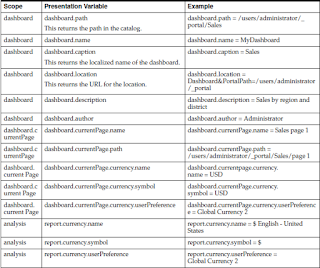
These are only few examples to help the reader understand that these pre-defined variables can be used quite effectively in rendering session, system, user, dashboard information/properties. Given below is the list of all such variables(from Oracle Users guide) :


Note :
- For time zone variables, the time zone for a user must be set to a value other than Default in order for this variable to work(goto MyAccount link to change timezone)
- Also these variables need to be references in the exact case as specified. Eg @{session.timeZone} will render correct results not @{session.timezone}. (Small z..)
.I have found these variables to come in handy in our projects and these are a big plus from a end user standpoint over the previous version.
Examples :
1. Display current time in the report title : Use @{system.currentTime} in the title view

2. Display login time for the user on the report subtitle : Use @{session.currentUser} logged in at @{session.loginTime
3. See timezone the user is in : Use @{session.timeZone}

These are only few examples to help the reader understand that these pre-defined variables can be used quite effectively in rendering session, system, user, dashboard information/properties. Given below is the list of all such variables(from Oracle Users guide) :


Note :
- For time zone variables, the time zone for a user must be set to a value other than Default in order for this variable to work(goto MyAccount link to change timezone)
- Also these variables need to be references in the exact case as specified. Eg @{session.timeZone} will render correct results not @{session.timezone}. (Small z..)
.I have found these variables to come in handy in our projects and these are a big plus from a end user standpoint over the previous version.
